Business types · Repair shop
Your workshop in order: every item with its history
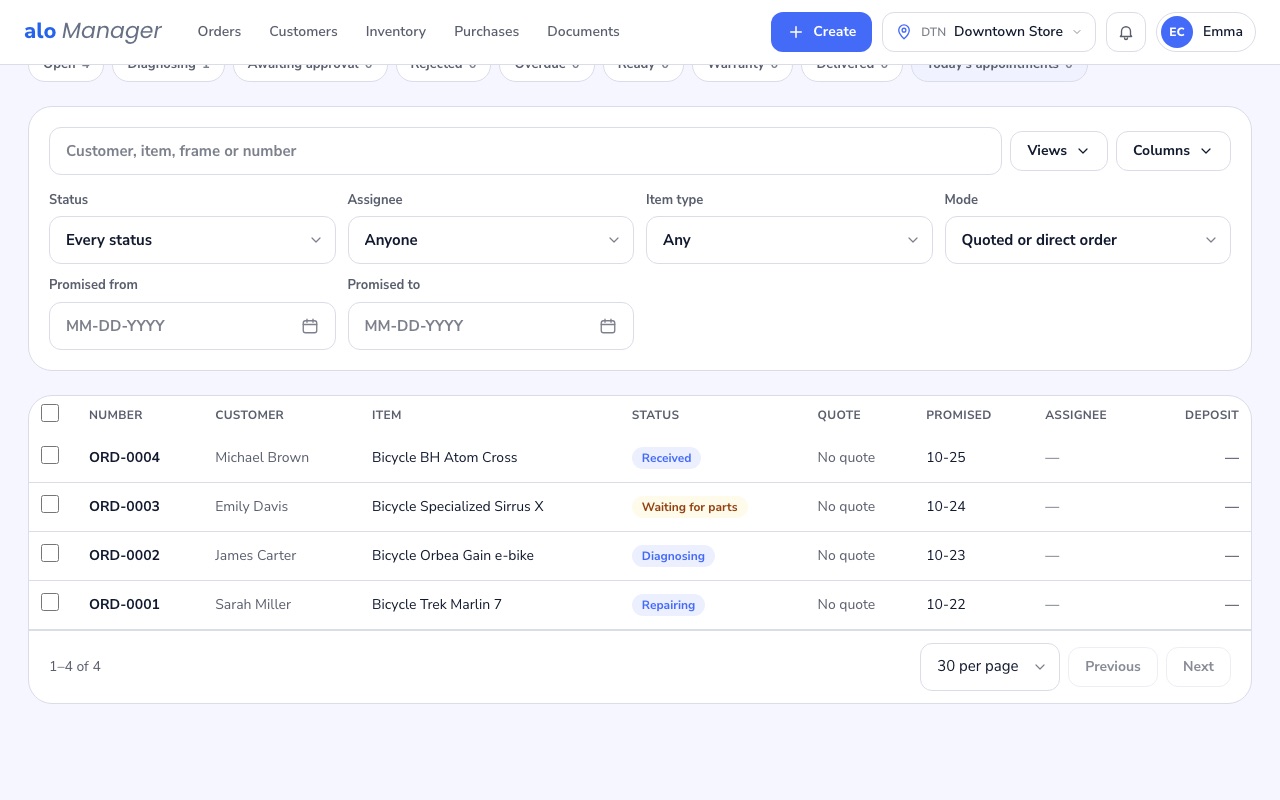
You take in the customer's bike, vehicle or appliance with its record, quote with versions and a deposit, order the parts from your supplier and keep the customer informed at every step.
No card required · No commission on your sales
How you work
What does your repair shop business look like?
Specific to this variant
Bikes and scootersIdeal for: Bike workshops, E-bikes, ScootersCalculate your price ↓Each bike with its brand, model and frame number, its repair history and the maintenance reminder by usage.
This business type works from a single location
Every person on your team in the panel
- 1 location × $50
- $50
- 2 users × $7
- $14
- Online store
- Included
- Accounting
- Included
- Annual discount (15%)
- −$115.20
- Annual total
- $652.80
Prices in US dollars, before tax.
Step by step
How a workshop order moves, from intake to hand-back
- 1
Intake
You register the item with its fields and its condition; if you use it, the customer signs the work order on screen.
- 2
Diagnosis
You check what is wrong and, if needed, build the quote with your service templates.
- 3
Approval
The customer approves it with the deposit you set; a change is a new version.
- 4
Repair
If a part is missing, it is ordered from the supplier and the workshop order waits for it; when it arrives, it goes back to work on its own.
- 5
Hand-back
You charge what was sold and applied, and hand it back at the store or at home.
What a workshop really needs
The customer's item, not your inventory
Item types with their own fields and their history, even years between workshop orders; if it changes owner, the history goes with it.
Quotes without arguments
Versioned, with the deposit you set on approval, and service templates with their labour and parts loaded in one click.
Parts that arrive on time
Approved parts nobody ordered show up in Purchases to be ordered; the workshop order waits and goes back to work when they arrive.
The customer kept informed
Received, quote, ready and delivered emails, and WhatsApp updates if you connect your WhatsApp Business number.
Appointments from your online store
Your customers book in the windows you offer, based on each location's hours.
You set the rules, the system does the work
What you decide, what happens on its own and what you do whenever you like
You set it up
- The item types and their fields
- Direct repair allowed or always with a quote
- The deposit on quote approval
- The service templates with their labour and parts
- The appointment windows of the online store
- The customer emails and the WhatsApp updates
- The warranty per task
It works on its own
- The work order when the item is taken in
- The history of each item
- The customer updates at each milestone
- The wait for the parts ordered
- The warranty return at no charge
- The maintenance reminder by usage
You do it whenever you like
- Take in an item
- Send a quote
- Order the parts from the supplier
- Share a photo with the customer
- Charge several workshop orders together
- Export to PDF or Excel
And everything else AloManager includes
Online store on your own domain
In Spanish and English, with online payment.
Customer account
Sign in with Google or Apple, history and payments.
Commission-free payments
Card via Stripe, cash and bank transfer.
Documents and signing
Invoices, quotes and contracts signed by link.
22 email templates
Editable per language, with a test send.
Complete customer profiles
Addresses, document, deposit and their own discount.
Coupons and discounts
With limits and your own combination policy.
Reports included
Sales, collected, pending and reviews.
Automatic reviews
Request and reminder after every service.
Team with permissions
With an activity log.
Taxes your way
By product, by customer and by location.
Exports
Orders, customers and products to Excel.
Frequently asked questions
About workshops
- Can I use it if I also sell or rent?
- Yes. The workshop combines with sales and rentals in the same company; the calculator gives you the price of each combination.
- Does the customer sign the work order?
- Yes, on screen or on a tablet; the signature is printed on the work order PDF.
- How do I order a part I don't have?
- From the repair: the purchase order goes out to your supplier and the workshop order waits for the part.
- Can I update the customer on WhatsApp?
- Yes, if you connect your company's WhatsApp Business number.